
We Didn't Run a Class. We Built an AI Workshop for Real Estate Around Pellago's Painpoints.
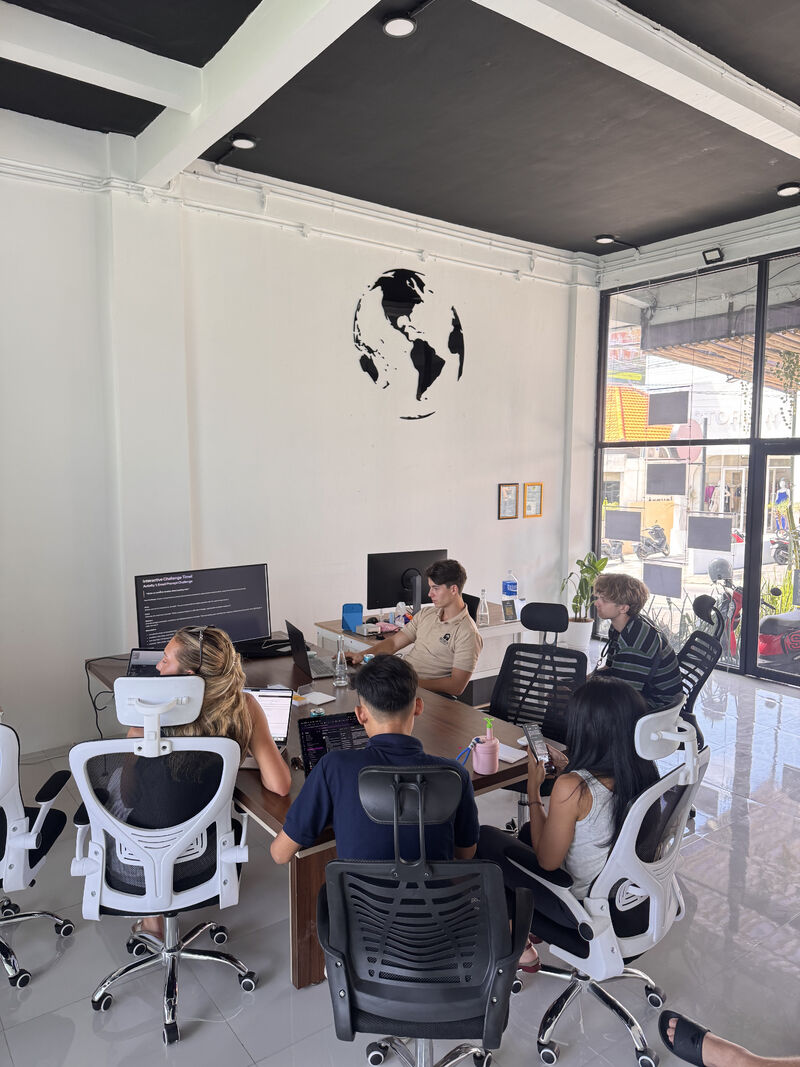
The photo above is the room. Six people from Pellago, a real estate management company, on their own laptops, running their own tasks. That is the whole idea. Nobody is watching a slide deck about what AI might do someday. They are doing the work, with us next to them.
Most corporate AI training fails the Monday test. The session feels useful, everyone nods, and nobody changes how they work the next morning. The reason is plain: a lecture about AI is not the same as using AI on the thing you were already going to do today. So we built this one backward from that problem.
The failure is not rare. McKinsey's research shows a wide gap between companies experimenting with generative AI and companies that have rewired a single workflow to capture value from it. You can read the pattern in their ongoing state of AI work: usage is climbing, but durable change at the task level lags behind. A workshop that ends in nodding heads is on the wrong side of that gap.
We started with a quiz, not slides
Before we wrote a single exercise, we sent Pellago a short quiz. It is the same instinct behind our Closed Loop Score: you cannot fix what you have not measured. The quiz asked where the team loses hours, which tasks they dread, and what they would automate first if a tool actually worked.
The answers ranked themselves. For a property management company the top of the list was not exotic. It was tenant communication, listing copy, summarising long lease and inspection documents, chasing follow-ups, and turning a messy week into a clean report. Real work, every day, all of it text-heavy. That is where AI earns its keep fastest.
So we threw out the generic agenda and built the session around the top 3 painpoints the quiz surfaced. Not what we wanted to teach. What they needed.
The quiz also sets a measurement baseline. When a manager writes down that lease review eats four hours a week, you have a number to beat in the session itself. By the end you are not arguing that AI helps in theory. You are pointing at the same task done in a fraction of the time, with the person who wrote down the figure sitting right there.
The workshop was their tasks, not generic prompts
Here is where most training goes wrong. The trainer demos "write a blog post about coffee" and the team claps, then goes back to a job that has nothing to do with coffee. We did the opposite. Every exercise used Pellago's work.
One person pasted a real tenant complaint and drafted three reply options in different tones. Another took a 12-page lease and turned it into a one-paragraph summary plus a list of the dates that matter. A third fed a folder of past listings into a tool and asked it to write a new listing in the company's voice. The tasks were theirs. The output was usable the second the session ended.
That is the difference between a class and a workshop. A class gives you notes. A workshop gives you finished work and the muscle memory to repeat it. It also has a side effect people underrate: when the input is the team's own document, every objection surfaces in the room. Someone notices the lease summary missed a renewal clause, so we fix the prompt together and the team learns where the tool needs a human check. A generic demo hides those edges because nobody knows the source well enough to catch a wrong answer.
The 5 free tools we put in their hands
We deliberately stayed on free tiers. A team adopts a tool it can open tomorrow with no budget meeting, so the stack had to cost nothing to start:
- ChatGPT for drafting replies, rewriting in different tones, and quick brainstorming.
- Claude for long documents: lease summaries, inspection reports, and anything where the input runs to many pages.
- Google NotebookLM for grounding answers in their own files, so the tool cites the actual document instead of guessing.
- Perplexity for research with sources: market questions, regulation checks, comparable listings.
- Gemini for the team already living inside Google Workspace, so AI sits next to the email and docs they use all day.
Five tools, zero cost, each mapped to a task the quiz had already flagged.
The free-tier choice is not a budget dodge. It removes the slowest part of adoption, which is approval. A team that has to file a request, wait for a manager, and route a card through finance loses the session's momentum long before the license clears. When the tool is already open, the only thing between learning and habit is the next task. We recommend a paid tier later, once a free tool hits a wall, and by then the team is asking for it instead of being sold it.
Which tool for which job
The map below is the cheat sheet the team kept next to their monitors. The point is not that one tool is best. It is that each task has an obvious first stop, so nobody wastes time deciding.
| Daily task | First tool to reach for | Why this one |
|---|---|---|
| Tenant reply, three tones | ChatGPT | Fast drafting and tone rewrites in one box |
| 12-page lease summary | Claude | Holds long documents without losing the middle |
| Answer grounded in their files | NotebookLM | Cites the actual document, not a guess |
| Market or regulation check | Perplexity | Returns sources you can verify |
| Drafting inside email and docs | Gemini | Lives where Workspace teams already work |
One more rule travelled with the table: never paste anything you would not email to a stranger. Free tiers can use inputs for training unless you opt out, so tenant names, contract figures, and anything personal get redacted before they touch a chat box. The workshop is the right place to set that habit, not an incident report later.
The 2 frameworks they kept
Tools change every few months. Frameworks last. So the part we cared about most was the 2 reusable patterns the team walked out with.
Framework 1: Context, Task, Format
The reason most people get weak output is that they type a wish, not a brief. We taught a three-part prompt pattern: give the tool the context (who you are, who the message is for), the task (what you actually want done), and the format (length, tone, bullet points or prose). The same three lines turn a vague reply into one the property manager would actually send.
The difference shows up when you compare a lazy prompt with a structured one. "Reply to this tenant" gets a polite paragraph that says nothing. The structured version gets a sendable message:
- Context: "I am a property manager. The tenant below is upset about a delayed repair and has emailed twice."
- Task: "Write a reply that acknowledges the delay, gives a concrete next date, and keeps the relationship intact."
- Format: "Under 120 words, warm but firm, no excuses, end with one clear next step."
Same tool, same tenant, different result. The team learned to write the three lines once and reuse the shape everywhere.
Framework 2: the daily-driver loop
The second pattern was about habit, not prompts. Draft with AI, edit as a human, then save the good prompt so next week starts from a template instead of a blank box. A team that saves its best prompts compounds. A team that retypes from scratch never builds speed. This is the same closed-loop thinking behind our automation work for real estate: the value is in the loop you keep running, not the one-off demo.
The step we drilled hardest: keep the human in the edit. A manager who signs off on a lease summary owns that summary, so the AI draft is a starting line, never a finish line. The teams that get burned paste output straight into a contract without reading it. The teams that win sharpen the draft in thirty seconds, then save the prompt and repeat.
A worked example: the lease summary math
Numbers settle arguments better than enthusiasm, so here is the one we ran live. A property manager at Pellago estimated a careful read of a 12-page commercial lease at around 35 minutes: skim, note the dates, flag the unusual clauses, write a short summary. With the Context, Task, Format prompt and Claude holding the full document, the same output landed in roughly 6 minutes including a human read-through.
Call it a saving of 29 minutes per lease. That figure means little alone, so we multiplied it by the team's real volume. The math below uses round numbers the team chose, not numbers we invented for a brochure.
- Leases and renewals reviewed across the team: about 40 per month.
- Time saved per document: roughly 29 minutes.
- Monthly saving: about 1,160 minutes, a little over 19 hours.
- Across a year: north of 230 hours, most of a working month and a half returned.
That is one task, on one tool, for one team. The exact hour count moves with volume and document length. The method is the point: measure the baseline, run the real task in the room, let the team do the multiplication. We were also honest about the limit. The 29 minutes is real for summarising, but a negotiation call still takes as long as it takes. AI compresses the text-heavy parts of the job, the parts that quietly eat the calendar. It does not compress judgement.
Common mistakes teams make after a workshop
We have watched enough teams adopt AI to know where the wheels come off. The session is the easy part. The four weeks after are where most efforts die, for the same handful of reasons.
- Treating the draft as the deliverable. The teams that get embarrassed pasted unread output into a contract. The edit step is the job.
- Not saving prompts. A great prompt typed once and forgotten is wasted. The teams that compound keep a shared doc of the prompts that worked, so the second person never starts from zero.
- One enthusiast, no system. A single power user makes the company look adopted while everyone else carries on by hand. If only one person uses the stack, the workshop failed.
- Pasting private data into free tiers. The convenience that makes free tools great also makes a careless paste a problem. Set the redaction habit on day one, not after a complaint.
- Chasing the newest model. The team that switches tools every time a headline drops never builds depth in any of them. Pick the stack, run the loop, and change a tool only when a workflow hits a wall.
Every one of these is a behaviour, not a knowledge gap. That is why a lecture cannot fix them and a coached session can.
Why hands-on beats a lecture
There is a reason we ran 2026 with real laptops open instead of a polished keynote. Adoption is a behaviour, and you cannot install a behaviour by talking at it. People believe a tool the moment it saves them on a task they own. When the lease summary appeared in front of a manager who had spent years skimming those documents by hand, the argument was over.
The learning research backs the instinct. Harvard Business Review has written for years about why passive training fades and practice sticks, pointing the same way our sessions do, toward doing over watching. You can browse the thread on the HBR site. A slide deck is recall under ideal conditions. A coached task is performance under real ones, and only the second survives a busy Monday.
That is also why we keep the group small. You cannot coach a packed lecture hall through a real task. You can coach six people through theirs. By the end, every person in that photo had shipped something they would have done by hand that week.
Who this workshop is not for
We turn down more of these than we run, because the format only pays off for a specific kind of team. It fits a team that writes, replies, and summarises all day, handles a steady stream of documents, and has the autonomy to change how it works without a six-month committee. Property management, agencies, operations roles, anyone drowning in text.
It does not fit a team looking for a motivational keynote to tick a training box. It does not fit a company that wants a custom model trained on a decade of proprietary data, which is an engineering project, not a workshop. And it does not fit a leader who wants to announce that the company "uses AI" without anyone changing a task on Monday. If theatre is the goal, there are cheaper ways to buy it.
What we'd run for your team
If your team writes, replies, and summarises all day, the path is the same one we ran for Pellago. Quiz first to find the real painpoints. Build the exercises around your own tasks. Put free tools in people's hands. Leave frameworks, not notes.
The shape is repeatable on purpose. A short quiz a week before. A half-day session built backward from the top three painpoints. Live exercises on the team's own work, coached one screen at a time. Two frameworks and a saved-prompt habit that outlive whichever tool is in fashion. A follow-up weeks later to see which prompts stuck and where the loop broke. That last step is the one most providers skip.
We have written more about how we think about adoption over theatre on the blog, and you can see the rest of our delivery in our case studies. If you want a sense of who runs these sessions, that is on the about page. And if you would rather see where AI fits in your stack before a workshop, our voice agent work is the other half of the same operator playbook.
Want this run for your team?
Related reading
- Automation for real estate: the systems we build after the workshop
- Case studies: what we have shipped for operators
- Run the Closed Loop Score to find your own painpoints
Frequently asked questions
What is an AI workshop for real estate?
A working session where a property team learns to use AI on their own tasks, not generic demos. We start with a quiz to find where they lose time, then run live exercises on tenant replies, listing copy, and lease summaries. The team leaves with finished work and a framework they reuse, not slides they forget by Monday. The format is built backward from one test: did anyone change how they work the next morning?
How do you decide what to teach the team?
We send a short quiz before the session. It surfaces the tasks that eat the most hours and the ones people quietly dread. We rank those, then build the agenda backward from the top 3. Pellago's quiz pointed straight at tenant communication and document summarising, so that is where we spent the time. The quiz also gives us a baseline to beat in the room, so the team times the saving themselves instead of taking our word for it.
Which AI tools did you use, and do they cost anything?
We stayed on free tiers on purpose: ChatGPT, Claude, Google NotebookLM, Perplexity, and Gemini. The point was a stack the team could open the next morning with no procurement and no budget approval. Each tool maps to one job, so nobody wastes time deciding which app to open. We only recommend a paid tier once a free tool hits a wall on real work.
Is this a lecture or hands-on?
Hands-on. People open their laptops and run their own tasks inside the session. By the end of a single exercise, a 12-page lease becomes a one-paragraph summary the person actually wrote, in front of us, with our coaching. Nobody leaves with theory they have to translate alone later. We keep the group small for this reason: you can coach six people through real work, but not a packed lecture hall.
Can you run this for a team outside real estate?
Yes. The format is task-first, so the industry is just the input. The quiz finds the painpoints, the exercises use the team's real work, and the frameworks transfer to any role that writes, summarises, or replies all day. Real estate is where we ran it for Pellago, not a limit on the method.
Related: read more operator notes on the blog, see case studies, or run the Closed Loop Score.